Healpyxel
  • Home
  • Quickstart
  • Source Code
  • Report a Bug
  1. Examples
  2. Visualization
  • Start
  • Examples
    • Quickstart
    • Visualization
    • Visualization : Gaussian PSF - WIP!
    • Accumulation - WIP!
    • Streaming - WIP!
  • API Reference
    • Package Structure
    • HEALPix Sidecar
    • HEALPix Aggregate
    • HEALPix Accumulator
    • HEALPix Finalize
    • Generate HEALPix sidecar
    • Optional Dependencies
    • Geospatial

On this page

  • Test Data
  • Quick Test with Sample Data
  • Create Sidecar for Sample Data
  • Aggregate Data by HEALPix Cells
    • Interpret the Results
    • HEALPix Metadata
  • Visualize HEALPix Map
  • Report an issue

Other Formats

  • CommonMark
  1. Examples
  2. Visualization

Visualization

Complete visualization workflow: sidecar creation, aggregation, and map display

Test Data

Check available test data in the package

Code
from pathlib import Path

# Look for test data
test_data_dir = Path('../test_data')
if test_data_dir.exists():
    print("Test data directory found!")
    print(f"\nContents:")
    for item in sorted(test_data_dir.iterdir()):
        if item.is_file():
            size_mb = item.stat().st_size / 1024 / 1024
            print(f"  {item.name}: {size_mb:.2f} MB")
        elif item.is_dir():
            n_files = len(list(item.glob('*')))
            print(f"  {item.name}/: {n_files} files")
else:
    print("Test data directory not found. Run create_test_data.sh to generate test data.")
Test data directory found!

Contents:
  README.md: 0.00 MB
  batches/: 10 files
  derived/: 1 files
  regions/: 0 files
  samples/: 3 files
  validation/: 2 files

Quick Test with Sample Data

If test data is available, let’s try a quick aggregation

Loading sample: sample_50k.parquet

Shape: (50000, 61)

Columns: ['ref_id', 'a', 'b', 'c', 'd', 'e', 'f', 'g', 'h', 'i', 'j', 'k', 'l', 'm', 'n', 'o', 'p', 'q1', 'q2', 'q3', 'q4', 'obs_id', 'vis_slope', 'nir_slope', 'visnir_slope', 'norm_vis_slope', 'norm_nir_slope', 'norm_visnir_slope', 'curvature', 'norm_curvature', 'uv_downturn', 'color_index_310_390', 'color_index_415_750', 'color_index_750_415', 'color_index_750_950', 'r310', 'r390', 'r750', 'r950', 'r1050', 'r1400', 'r415', 'r433_2', 'r479_9', 'r556_9', 'r628_8', 'r748_7', 'r828_4', 'r898_8', 'r996_2', 'spot_number', 'lat_center', 'lon_center', 'surface', 'width', 'length', 'ang_incidence', 'ang_emission', 'ang_phase', 'azimuth', 'geometry']

First few rows:
ref_id a b c d e f g h i ... lat_center lon_center surface width length ang_incidence ang_emission ang_phase azimuth geometry
0 1310408274001158 0 1 1 1 9 1 1 0 0 ... 5.186568 272.40450 1567133.40 1006.63727 1982.1799 43.049232 34.814793 77.85916 109.019295 b'\x01\x03\x00\x00\x00\x01\x00\x00\x00\x05\x00...
1 1335313413800913 0 0 0 0 9 1 1 0 0 ... -60.939438 71.77686 13564574.00 4064.49850 4249.2210 64.178116 37.690910 101.84035 111.930336 b'\x01\x03\x00\x00\x00\x01\x00\x00\x00\x05\x00...
2 1224306405800836 0 2 2 2 9 1 1 0 0 ... 5.613894 54.23045 1755143.50 1013.51886 2204.9104 53.815990 24.053764 77.86254 99.559425 b'\x01\x03\x00\x00\x00\x01\x00\x00\x00\x05\x00...
3 1421301274400732 0 1 1 1 9 1 1 0 0 ... -41.672714 324.49740 23309360.00 6511.20950 4558.0470 52.841824 46.625698 99.40995 121.833626 b'\x01\x03\x00\x00\x00\x01\x00\x00\x00\x05\x00...
4 1310308273500668 0 0 0 0 9 1 1 0 0 ... 26.975400 284.81708 905292.56 480.38028 2399.4622 56.780300 21.083624 77.85945 97.433360 b'\x01\x03\x00\x00\x00\x01\x00\x00\x00\x05\x00...

5 rows × 61 columns

file size_mb n_rows lat_min lat_max lon_min lon_max filename
0 samples/sample_50k.parquet 18.891136 50000 -74.986440 74.946884 0.020273 359.96555 sample_50k
1 samples/sample_5k.parquet 1.941895 5000 -74.954390 74.846540 0.274960 359.80890 sample_5k
2 samples/sample_25k.parquet 9.614980 25000 -74.934560 74.767715 0.057941 359.97324 sample_25k
3 derived/cli_quickstart/sample_50k-aggregated-d... 2.431089 49152 NaN NaN NaN NaN sample_50k-aggregated-densified.cell-healpix_a...
4 derived/cli_quickstart/sample_50k-aggregated.c... 0.806005 10860 NaN NaN NaN NaN sample_50k-aggregated.cell-healpix_assignment-...
5 derived/cli_quickstart/sample_50k.cell-healpix... 0.430335 54931 NaN NaN NaN NaN sample_50k.cell-healpix_assignment-fuzzy_nside...
6 derived/cli_quickstart/sample_50k-aggregated.c... 0.538363 10860 NaN NaN NaN NaN sample_50k-aggregated.cell-healpix_assignment-...
7 derived/cli_quickstart/sample_50k-aggregated-d... 0.552613 12288 NaN NaN NaN NaN sample_50k-aggregated-densified.cell-healpix_a...
8 derived/cli_quickstart/sample_50k-aggregated-d... 0.850032 12288 NaN NaN NaN NaN sample_50k-aggregated-densified.cell-healpix_a...
9 derived/cli_quickstart/sample_50k-aggregated.c... 1.134424 27990 NaN NaN NaN NaN sample_50k-aggregated.cell-healpix_assignment-...
10 derived/cli_quickstart/sample_50k.cell-healpix... 0.525922 59592 NaN NaN NaN NaN sample_50k.cell-healpix_assignment-fuzzy_nside...
11 derived/cli_quickstart/sample_50k-aggregated.c... 1.828314 27990 NaN NaN NaN NaN sample_50k-aggregated.cell-healpix_assignment-...
12 derived/cli_quickstart/sample_50k-aggregated-d... 1.302203 49152 NaN NaN NaN NaN sample_50k-aggregated-densified.cell-healpix_a...
13 validation/high_quality_subset.parquet 9.039313 25121 -74.992330 74.683150 175.000180 184.99979 high_quality_subset
14 validation/combined_batch_001_003.parquet 3.963343 10890 -74.627014 74.447170 175.000180 177.99991 combined_batch_001_003
15 batches/batch_009.parquet 1.613665 4417 -74.822310 74.647300 183.000080 183.99973 batch_009
16 batches/batch_003.parquet 1.373512 3734 -73.450960 74.447170 177.000500 177.99991 batch_003
17 batches/batch_007.parquet 1.530362 4174 -73.332790 74.656006 181.000610 181.99995 batch_007
18 batches/batch_010.parquet 1.799953 4931 -74.797844 74.683150 184.000270 184.99979 batch_010
19 batches/batch_004.parquet 1.463505 3990 -74.927130 74.425640 178.000030 178.99997 batch_004
20 batches/batch_006.parquet 1.424916 3885 -74.992330 74.492300 180.000020 180.99980 batch_006
21 batches/batch_008.parquet 1.635924 4482 -74.920740 74.619770 182.000020 182.99991 batch_008
22 batches/batch_001.parquet 1.117513 3029 -74.627014 74.381710 175.000180 175.99908 batch_001
23 batches/batch_005.parquet 1.655387 4502 -74.632195 74.596970 179.000470 179.99990 batch_005
24 batches/batch_002.parquet 1.513108 4127 -73.357796 74.422920 176.000030 176.99920 batch_002

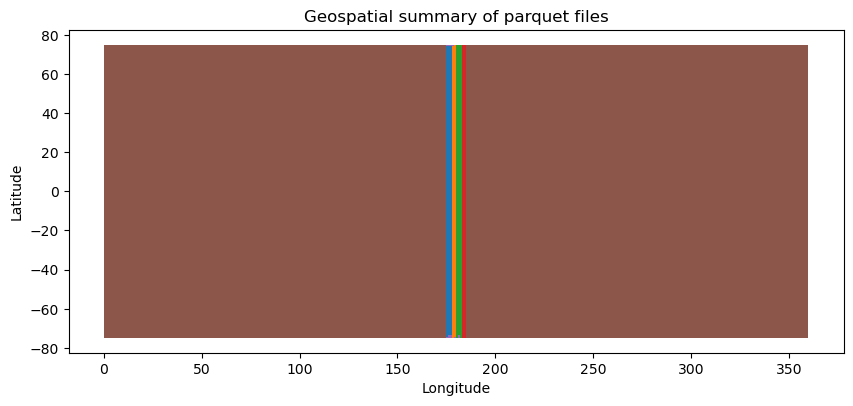
Those are the boundaries used to sample the initial data

# #| hide
# # convert to geopandas creating a polygon box with lat_min    lat_max lon_min lon_max per file
# ax = gdf_stats[~gdf_stats.filename.str.contains('sample')].plot(column='filename', legend=False, figsize=(20, 6), aspect=0.25)
# ax.set_xlim([150, 200])
# ax.set_xlabel('Longitude')
# ax.set_ylabel('Latitude')
# ax.set_title('Geospatial coverage of parquet files (excluding sample files)')

Create Sidecar for Sample Data

Now let’s create a HEALPix sidecar for the sample data. We can do this in memory without writing to a file.

Code
# Load the 50k sample
import geopandas as gpd
from shapely import wkb

sample_file = test_data_dir / 'samples' / 'sample_50k.parquet'
print(f"Loading: {sample_file}")

# Read as regular pandas DataFrame first (geometry is stored as WKB binary)
df = pd.read_parquet(sample_file)
print(f"Loaded {len(df)} rows")
print(f"Columns: {list(df.columns)}")

# Convert WKB geometry column to shapely geometries
if 'geometry' in df.columns:
    print("\nConverting WKB geometry to GeoDataFrame...")
    df['geometry'] = df['geometry'].apply(lambda x: wkb.loads(bytes(x)) if x is not None else None)
    gdf = gpd.GeoDataFrame(df, geometry='geometry', crs='EPSG:4326')
    print(f"CRS: {gdf.crs}")
else:
    print("\nNo geometry column found!")
    gdf = df

# Show first few rows
gdf.head(3).iloc[:,-10:]
Loading: ../test_data/samples/sample_50k.parquet
Loaded 50000 rows
Columns: ['ref_id', 'a', 'b', 'c', 'd', 'e', 'f', 'g', 'h', 'i', 'j', 'k', 'l', 'm', 'n', 'o', 'p', 'q1', 'q2', 'q3', 'q4', 'obs_id', 'vis_slope', 'nir_slope', 'visnir_slope', 'norm_vis_slope', 'norm_nir_slope', 'norm_visnir_slope', 'curvature', 'norm_curvature', 'uv_downturn', 'color_index_310_390', 'color_index_415_750', 'color_index_750_415', 'color_index_750_950', 'r310', 'r390', 'r750', 'r950', 'r1050', 'r1400', 'r415', 'r433_2', 'r479_9', 'r556_9', 'r628_8', 'r748_7', 'r828_4', 'r898_8', 'r996_2', 'spot_number', 'lat_center', 'lon_center', 'surface', 'width', 'length', 'ang_incidence', 'ang_emission', 'ang_phase', 'azimuth', 'geometry']

Converting WKB geometry to GeoDataFrame...
CRS: EPSG:4326
lat_center lon_center surface width length ang_incidence ang_emission ang_phase azimuth geometry
0 5.186568 272.40450 1567133.4 1006.63727 1982.1799 43.049232 34.814793 77.85916 109.019295 POLYGON ((272.39758 5.16433, 272.41583 5.18307...
1 -60.939438 71.77686 13564574.0 4064.49850 4249.2210 64.178116 37.690910 101.84035 111.930336 POLYGON ((71.72596 -60.89612, 71.69186 -60.963...
2 5.613894 54.23045 1755143.5 1013.51886 2204.9104 53.815990 24.053764 77.86254 99.559425 POLYGON ((54.24406 5.63592, 54.22025 5.62014, ...

Create sidecar in memory using the process_partition function

Code
# Create sidecar in memory using the process_partition function
from healpyxel.sidecar import process_partition

# Parameters
nside = 32  # HEALPix resolution
mode = 'fuzzy'  # 'fuzzy' allows multiple cells per geometry, 'strict' only single-cell geometries

# Process the GeoDataFrame
sidecar_df = process_partition(
    gdf=gdf,
    nside=nside,
    mode=mode,
    base_index=0,  # Start source_id from 0
    lon_convention='0_360',  # Use '0_360' or '-180_180' (underscores, not hyphens!)
)

print(f"Created sidecar with {len(sidecar_df)} assignments")
print(f"Unique geometries: {sidecar_df['source_id'].nunique()}")
print(f"Unique HEALPix cells: {sidecar_df['healpix_id'].nunique()}")
print(f"\nSidecar columns: {list(sidecar_df.columns)}")
print(f"Sidecar dtypes:\n{sidecar_df.dtypes}")

# Show first few assignments
sidecar_df.head(10)
2026-02-05 17:06:31,997 INFO Partition (lon_convention=0_360): processed 50000 geometries, dropped 12 (0.0%) total [pre-filter: 12, post-processing: 0]
Created sidecar with 54931 assignments
Unique geometries: 49988
Unique HEALPix cells: 10860

Sidecar columns: ['source_id', 'healpix_id', 'weight']
Sidecar dtypes:
source_id       int64
healpix_id     UInt64
weight        float64
dtype: object
source_id healpix_id weight
0 0 7943 1.0
1 1 8287 1.0
2 2 5819 1.0
3 3 11685 1.0
4 4 3618 1.0
5 5 3805 1.0
6 6 9522 1.0
7 7 10975 1.0
8 8 1820 1.0
9 9 3710 1.0

Check how many cells each geometry touches (for fuzzy mode)

Assignment statistics:
  Min cells per geometry: 1
  Max cells per geometry: 4
  Mean cells per geometry: 1.10
  Median cells per geometry: 1

Distribution of assignments per geometry:
1    45331
2     4396
3      236
4       25
Name: count, dtype: int64

Optional: Save sidecar to file for later use

Code
sidecar_output = pathlib.Path(f'/tmp/sample_50k_sidecar_nside{nside}_{mode}.parquet')
sidecar_df.to_parquet(sidecar_output, index=False)
print(f"Saved sidecar to: {sidecar_output}")
print(f"File size: {sidecar_output.stat().st_size / 1024:.2f} KB")
Saved sidecar to: /tmp/sample_50k_sidecar_nside32_fuzzy.parquet
File size: 441.63 KB

Aggregate Data by HEALPix Cells

Now let’s use the sidecar to aggregate the r1050 column from the original data by HEALPix cells.

✓ Column 'r1050' found in the data
  Range: [-0.050, 0.325]
  Missing values: 0 / 50000

Aggregate r1050 by HEALPix cells with explicit aggregation functions.

Convert GeoDataFrame to regular DataFrame for aggregation (geometry not needed)/

2026-02-05 17:06:32,336 INFO Creating source_id column from DataFrame index
2026-02-05 17:06:32,366 INFO Sidecar source_id overlap: 49988/49988 (100.0%)
2026-02-05 17:06:32,366 INFO Merging sidecar with original data
2026-02-05 17:06:32,371 INFO Grouping by healpix_id and computing aggregations
2026-02-05 17:06:32,437 INFO Processing 10860 HEALPix cells
2026-02-05 17:06:35,115 INFO Aggregation complete: 10860 cells with data
Aggregated data shape: (10860, 6)
Number of HEALPix cells with data: 10860

Aggregated columns: ['r1050_mean', 'r1050_median', 'r1050_std', 'r1050_mad', 'r1050_robust_std', 'n_sources']
r1050_mean r1050_median r1050_std r1050_mad r1050_robust_std n_sources
healpix_id
0 0.048616 0.047857 0.003759 0.002672 0.003962 4
1 0.051467 0.052283 0.002976 0.001888 0.002799 6
2 0.049697 0.049118 0.003637 0.002289 0.003394 6
3 0.059066 0.063241 0.007149 0.001711 0.002537 3
4 0.051262 0.051523 0.006552 0.002510 0.003721 9
5 0.047092 0.047639 0.008176 0.003183 0.004719 7
6 0.058219 0.058195 0.002682 0.002040 0.003024 6
7 0.053656 0.054208 0.008577 0.006288 0.009323 8
8 0.037711 0.037711 0.008823 0.008823 0.013080 2
9 0.041094 0.041094 0.012205 0.012205 0.018096 2

Interpret the Results

Each row represents one HEALPix cell with: - healpix_id: The HEALPix cell identifier - r1050_mean: Mean of r1050 values in this cell - r1050_median: Median value (less affected by outliers) - r1050_std: Standard deviation (spread of values) - r1050_mad: Median Absolute Deviation (robust measure of spread) - r1050_robust_std: MAD * 1.4826 (approximates standard deviation for normal distributions) - n_sources: Number of source measurements in this cell, for all columns

Let’s examine the statistics of the aggregated data.

first, Display summary statistics of the aggregated results on HEALPix cells:

Check the distribution of source counts per HEALPix cell:


Cells with only 1 source: 1644
Cells with 2-5 sources: 5696
Cells with 5+ sources: 3520
n_sources
count 10860.000000
mean 5.058103
std 4.835600
min 1.000000
25% 2.000000
50% 4.000000
75% 6.000000
max 98.000000

HEALPix Metadata

The aggregation results don’t automatically include HEALPix metadata. You need to track this separately or read it from a saved sidecar file. For in-memory workflows, store metadata explicitly:
HEALPix Configuration:
  nside: 32
  order: nested
  nested: True
  mode: fuzzy

Reading metadata from saved sidecar files:

If you save the sidecar to a parquet file (like we did earlier), the metadata is embedded in the parquet schema and can be read back.

Read metadata from saved sidecar file:

Metadata from saved sidecar file:
  nside: N/A
  mode: N/A
  order: N/A

Visualize HEALPix Map

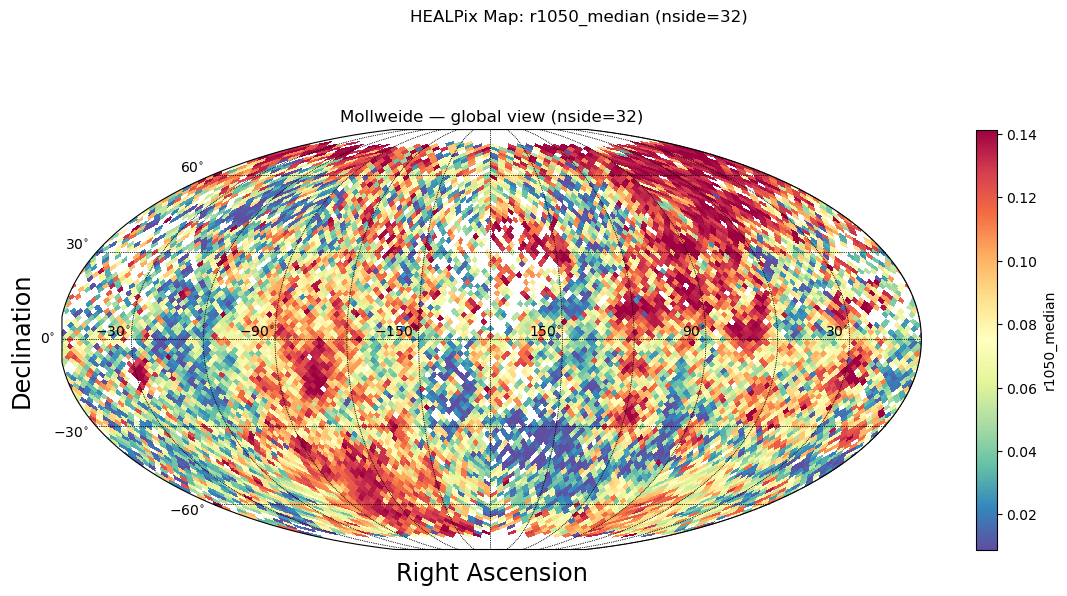
Before visualizing, we need to densify the sparse aggregated data to include all HEALPix cells (including empty ones).

We’ll use the visualization utilities from healpyxel.visualization module.

The aggregated DataFrame only contains cells with data (sparse).

Densify to create a full HEALPix grid with all npix = 12 * nside^2 cells

2026-02-05 17:06:35,263 INFO Densified from 10860 to 12288 cells (nside=32)
Sparse aggregated cells: 10860
Dense HEALPix grid cells: 12288 (expected: 12288)

Empty cells (no data): 1428
Cells with data: 10860
r1050_mean r1050_median r1050_std r1050_mad r1050_robust_std n_sources
healpix_id
0 0.048616 0.047857 0.003759 0.002672 0.003962 4.0
1 0.051467 0.052283 0.002976 0.001888 0.002799 6.0
2 0.049697 0.049118 0.003637 0.002289 0.003394 6.0
3 0.059066 0.063241 0.007149 0.001711 0.002537 3.0
4 0.051262 0.051523 0.006552 0.002510 0.003721 9.0
5 0.047092 0.047639 0.008176 0.003183 0.004719 7.0
6 0.058219 0.058195 0.002682 0.002040 0.003024 6.0
7 0.053656 0.054208 0.008577 0.006288 0.009323 8.0
8 0.037711 0.037711 0.008823 0.008823 0.013080 2.0
9 0.041094 0.041094 0.012205 0.012205 0.018096 2.0

Import visualization utilities from healpyxel and prepare the HEALPix map for visualization

Code
# Import visualization utilities from healpyxel
from healpyxel.visualization import prepare_healpix_map
import numpy as np

# Prepare the HEALPix map for visualization
output_column = 'r1050_median'

healpix_map, valid_pixels, invalid_pixels, mappable = prepare_healpix_map(
    aggregated_dense,
    output_column=output_column,
    equalize=True,  # Apply histogram equalization for better contrast
    percentile_cutoff=None,  # Optional: clip outliers, e.g., 5 for [5%, 95%]
    cmap='Spectral_r'
)

print(f"HEALPix map prepared:")
print(f"  Total pixels: {len(healpix_map)}")
print(f"  Valid pixels: {valid_pixels.sum()}")
print(f"  Invalid pixels: {invalid_pixels.sum()}")
HEALPix map prepared:
  Total pixels: 12288
  Valid pixels: 10860
  Invalid pixels: 1428

  • Report an issue